
Overdue investigations
See today what is late
Filter the register to overdue events, with reminders before and after each due date.
See how it worksFor quality teams replacing paper forms and Excel trackers, and preparing for Revised Schedule M inspections. Every event sits in one register with its status, and the investigation, signatures and linked CAPA stay on one record you can show an inspector.
On paper and in Excel, one deviation ends up across forms, logbooks, spreadsheets, e-mail and a shared drive. Investigations run late and nobody sees it until the audit. Complere brings deviation management into your eQMS, with one record for each event and one list for all of them.
What counts as a quality event?Filter the register to overdue events, with reminders before and after each due date.
See how it worksEveryone files against one cause library, and the list counts the events per cause.
See how it worksA reviewer checks the reasoning and can return it, with a required reason on the record.
See how it worksThe investigation, signatures, linked CAPA and audit trail all sit on the event.
See how it works4 minutes 42 seconds on real product screens. Short on time? Jump to the chapter you care about.
0:00 The problem: one deviation, scattered everywhere
On a line, in a lab, or in a clinic, something goes wrong some days. The write-up is called a deviation, and it must be investigated and closed. The trouble is where it lives: paper forms and logbooks, spreadsheets and lists, e-mail and chat, a shared drive, and the old system nobody fully trusts. Something went wrong on batch twenty-four, one-seventeen. What was done about it, and is it closed?
0:26 One list for every deviation
Complere keeps every deviation in one list, and each row shows how far it has come. It calls them quality events.
0:36 One example: DEV-1, rated on a ready-made severity scale
Here is one; its ID is DEV-1. Batch 24-117 was a test run: broth instead of medicine, to prove the line stays sterile. Two vials turned cloudy: germs had grown in them. Luis Herrera reported it, with the batch, the room, and how serious it is: High, Major, so the next batch waits. That rating comes from a seven-level scale that ships ready to use, from negligible to catastrophic.
1:04 Where it started: a ready form
Luis didn't start from a blank page. The deviation template filled in the ID, the fields to record, who signs, and the deadline. Each kind of event gets its own template: set it up once, and every event of that kind starts the same way.
1:22 Set steps, a signer for each, and a time limit
In regulated work, each step needs a named person's sign-off before it moves on. So DEV-1 was logged, then investigated, then checked, then signed off by quality, and finally closed, each step with its own signer and time limit. Marcus Chen, who runs the case, signed first to open the investigation: which germ it was, the room's cleanliness records, and the gowning log.
1:47 What caused it: the built-in cause library
Amara Diallo, the investigator, picked the cause from a library that comes ready to use: seventeen categories and more than a hundred common causes, from human error to supplier issues. You decide which teams see them, and you add your own beside them. Everyone uses the same list, so you can see which problems keep coming back. DEV-1 was filed under Environment, where the germ turned up.
2:13 Why it happened: evidence, 5 Whys and a second check
Then she checked the evidence. The germ in the vials matched one found on a gown: a skin germ. She asked why, five times. Why on the gown? The operator had adjusted their goggles after putting gloves on. Why? The gowning steps never set that order, and nobody checked. She wrote down what it meant for other batches, and signed. Marcus Chen checked her work and signed: cause confirmed, a fix raised and linked, and a stop-gap in the meantime, with a second person checking the gowning before anyone goes in.
2:49 What it set in motion: linked records and where each stands
The fix became its own record, and so did everything it started. Each shows its status today. The corrective action, the plan to stop it happening again, has its tasks done, and the check that they worked is still open. The gowning procedure was rewritten. Of the two people trained on it, Luis has finished and Jake has not yet, so the training stays open. A risk assessment is under review. Each one links back to DEV-1.
3:17 Signed with a password, closed by quality
Nothing moves on until the named person signs with their password, and the record keeps their name, role and the time. Grace Kim, from the quality team, closed it on the second of October, with her reason on the record: cause confirmed, the fix tracked under the linked corrective action.
3:38 Every step kept: the audit trail
Every step is kept: who, when, and the note they signed with. That history is the audit trail, and it exports. Even retiring a closed deviation takes another signature and a written reason.
3:53 The answer, and what an inspector checks
The answer: the cause was the order of goggles and gloves. Amara Diallo investigated, Marcus Chen confirmed it, Grace Kim closed it on the second of October. Anything still open, like Jake's training, stays on the record with its status. Recorded and rated. Investigated to the cause. Impact assessed. Closed by quality. Every step recorded, every sign-off signed. A deadline on the record, the corrective action linked. Deviation handling you can show an inspector. See how one connected record can anchor your whole quality system. Request a demo.
Set a target resolution time on the template, and each event carries a target date. The register shows you which ones have passed it.
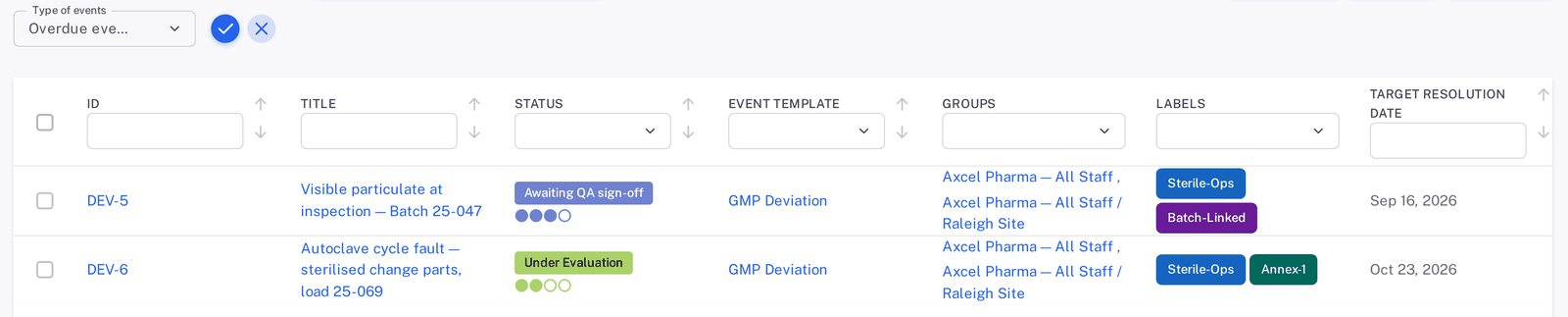
Per template and per status, so each step has its own deadline.
E-mail reminders before and after the due date, as you configure them.
Ongoing, Action Required and Over Due lists on the dashboard.

All events in one register, with their status and site.
Every open and closed event sits in one list, and each row shows how far it has come.
The cause, the 5 Whys and the impact assessment sit on one form, and a reviewer checks them before quality signs.

DEV-1, a demo deviation: the event cause, then all five whys with their answers.
The investigator picks the event cause from your library, then works through 5 Whys or writes the root cause as open text.

DEV-1's written assessment, with the matrix options above it.
Write the risk and impact assessment as open text, or score it on a 3×3, 4×4 or 5×5 risk matrix.
Everyone files against one cause library, so you can compare the counts.

An Event Count on every cause, and a register you can filter by cause or export.
17 categories and more than a hundred common causes, so every investigator files against the same list from day one.
Keep them beside the built-in ones, and decide which teams see which.

Seven built-in levels, each with its Total Events count.
A seven-level scale from negligible to catastrophic is in place from day one, so teams stop inventing their own ratings. Each level shows how many events carry it.
This is DEV-1, a demo deviation, on its real Workflows tab. The role beside a status is the one that signs while the event sits there, and each card keeps the signer, the time, the remark and the time spent in that status.

Luis Herrera reports the event, and a coordinator signs to open the investigation. Marcus Chen's remark lists what the investigation needs: the organism identification, the EM trend and the gowning log.

The investigator, in the Inquiry officers role, works the case and signs. Amara Diallo's remark records the finding: the same organism on both units and on the gown plate.

A reviewer checks the investigation. Marcus Chen's remark confirms the root cause, names the linked CAPA and sets a stop-gap: a second person checks gowning at the airlock.

Quality signs last, under the QAS role. Grace Kim's remark closes the deviation and says where the rest is tracked: under the linked CAPA and its change control.

All signatures are in place, and nobody signs at this status. The card keeps the date the event closed.
Bottlenecks show up on the record: DEV-1 waited 3 weeks 5 days at QA sign-off, and the card says so.
And where the answer sits in Complere.
The register, with a severity level on each event.
The Inquiry Form, with 5 Whys and the cause library.
The risk and impact assessment on the same form.
Awaiting QA sign-off, signed with a password.
The audit trail, the Roles tab and the signatures.
The target resolution date and the Linked Items tab.

Moving to Closed: the warning, then the signer's password.
A status moves on only when the named role signs with their password. The signature keeps their name, role, the time and any reason they enter.
See the FDA 21 CFR Part 11 and EU GMP Annex 11 controls
DEV-1's audit trail: Grace Kim's closing signature, with the remark and the time.
Immutable audit trail — database-enforced. Audit records cannot be modified or deleted, enforced by database-level constraints.
The corrective action, the procedure change and the training each get their own record, and the event links to them.

CAPA-1, the corrective action DEV-1 led to: its Linked Items tab names the procedure and the deviation.
Link an event to records in Documents, CAPAs, Change Requests and Training, and see them on its Linked Items tab. A closed deviation keeps its links, so open work does not disappear.
Each follow-up keeps its own record and status, and you can hand over the event as a PDF.
The CAPA holds the actions and the effectiveness check.
How CAPA worksLink a Change Request when the fix changes a process.
How change control worksLink the document the event touches.
How document control worksLink the training that follows the event.
How training worksReport templates carry variables that fill from the record, and authorised users download the PDF.
Each kind of event you handle gets its own template. Start with one, and add the rest when you are ready.

The demo GMP Deviation template: prefix DEV, target resolution time 14 days.
A template sets the ID prefix, default title, target resolution time, departments, products, labels and your own fields, and every new event starts from it.

A new deviation: the template has filled the prefix, title and labels, and added Batch Number and Cleanroom Grade.
Use the Minimal form for a quick first report, or the Full form for everything at once. Complere generates the ID from the prefix.

Default signers fill in on the form. Preliminary reviewers and Initiators are options you can turn on.
Choose the signers for each role, how many must sign, and default signers per role.
What a quality head asks before booking a demo.
Move deviations off paper before the inspector arrives: every investigation, signature and linked CAPA on one record, with its audit trail.
Talk to us about your siteNine validation artefacts per module, delivered on day one and included with the licence.
See what ships in the packImport your paper and legacy records into Complere, and keep a record of exactly what came across.
How it worksAbout a week on the pilot, 2 to 4 weeks on Foundation and 4 to 8 on Professional. The rollout plan covers the rest.
See the rollout planA 30-day pilot on one workflow, for one site or team, with no licence fee.
Start with pilotBuilt so small manufacturers and start-ups can use it too. Every plan includes the same audit trail, e-signatures and validation pack, and your quote is scoped to your team.
Compare plansEach customer gets its own database and storage bucket.
See the Trust CenterStep-by-step guides for creating, investigating and signing events.
Open the Events guidesUse the deviation checklist and the 5-Whys template on your next investigation.
Get the deviation checklistWhat quality teams ask when they move deviations off paper and Excel.
It is the record of something that went wrong and has to be investigated and closed. A deviation is the usual example. Each kind of event your SOPs define gets its own template, with its own prefix, fields and time limit.
Complere gives your site the records for deviation handling: a signed investigation, a root cause, a linked CAPA and an audit trail. Meeting Revised Schedule M stays with your site and your quality system.
Three things help. The 5 Whys makes the investigator show the reasoning on the record. A reviewer checks it and can send it back with a required reason. And the Event Count on each cause shows you when one cause is being overused.
Import your paper and legacy records into Complere. Enter them into our spreadsheet templates, check the results before anything goes live, and keep a record of exactly what came across.
The deviation closes when quality signs it. The CAPA keeps its own status and its effectiveness check, linked to the event, so the open work stays visible after closure. Your SOP decides when quality signs.
Coordinators sign at Created, Inquiry officers at Under Inquiry, Reviewers at Under Evaluation and QAS at Awaiting QA sign-off. Nobody signs at Closed. You choose the signers for each role and the minimum number of sign-offs, and you can add a preliminary review.
No code is involved. An administrator sets up the templates, custom fields and signers in the module settings. Custom fields can be text, number, date or dropdown, on the main form or inside the inquiry section.
Yes. Set up one template, run it for one site or team, and add the rest when you are ready. That is how the free pilot works.
You can add recipients from outside the system on an event, and every e-mail sent stays on the event's Emails tab. Authorised users can also download the event as a PDF built from your report template.
Yes, if you turn on that optional setting. Reopening takes a signature and a required reason, and the signer chooses the status it lands on. Retiring a closed event as Obsolete takes a signature and a written reason, and it then drops out of the default list. Both are in the audit trail.
The audit trail exports to CSV, Excel and PDF, and events lists export to CSV and Excel. Authorised users can also download an event as a PDF built from a report template.
We will walk it through Complere with you, from the first report to closure, or start a free pilot on one workflow.