
Attribution
Every action is user-attributed
All changes, approvals, and sign-offs capture the unique user identity, role, and timestamp — eliminating the 'shared login' risk that inspectors frequently flag.
Data integrity in pharma is one of the most heavily scrutinized parts of inspection readiness. Complere addresses the ALCOA+ framework at the platform level, embedding attribution, timestamping, original record preservation, and controlled access into every quality workflow so evidence stays inspection-ready without relying on manual reconstruction.

How this module improves quality operations, reduces compliance risk, and supports inspection readiness for regulated teams.
All changes, approvals, and sign-offs capture the unique user identity, role, and timestamp — eliminating the 'shared login' risk that inspectors frequently flag.
Complere records activity in real time. Backdating and after-the-fact edits are controlled and tracked, preserving original record integrity.
Linked audit trails, exportable history, and contextual record views mean quality teams can respond to inspector requests without reconstructing evidence from multiple systems.
Each step in this workflow is supported by governed records, electronic signatures, and a full audit trail — so quality operations stay traceable and inspection-ready.
A user completes a quality workflow step — drafting a document, submitting a CAPA, closing an audit finding.
The system binds the action to the user's identity, role, session, and timestamp automatically.
The audit trail is accessible directly from the quality record — not in a separate admin log.
Quality teams can export full audit trail histories in structured formats for inspector review.
The specific controls, features, and workflow functions built into this module to support your quality and compliance objectives.
Identity, role, timestamp, IP context, and action type are captured on every quality event — approval, revision, rejection, or status change.
Old and new field values, reason-for-change notes, and linked workflow context appear together — not buried in a separate system log.
Approved records are locked. Revision creates a new controlled version; the original is retained and accessible throughout the lifecycle.
Complere captures the complete workflow history including draft, review, rejection, resubmission, and approval — not just the final approved state.
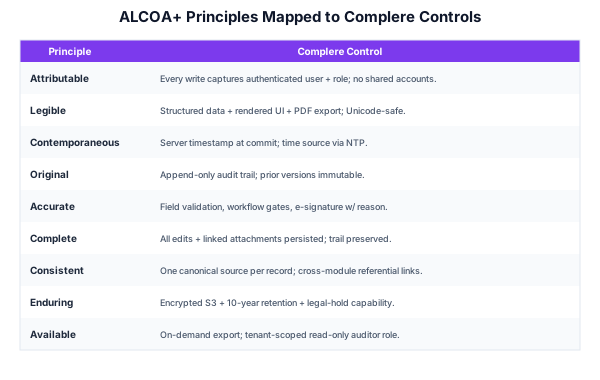
How Complere addresses each of the nine ALCOA+ data integrity principles at the platform level — not as a configuration option, but as a baseline behaviour.
Every quality action is bound to the user who performed it — name, role, timestamp, and IP context are captured automatically.
Records are readable now and throughout the retention period. Field changes show old and new values alongside reason-for-change notes.
Quality records are created and timestamped at the point of action — not reconstructed after the fact or backdated.
The first approved state of a record is preserved. Revisions create new controlled versions; originals remain accessible.
Records reflect what actually happened. Complere workflow controls prevent unauthorized edits after approval and flag data anomalies.
Complere captures the full workflow history — draft through approval — and keeps records accessible over the complete retention period.
Comparing eQMS vendors on audit trail and ALCOA+? See Best eQMS for 21 CFR Part 11 + the Audit Trail Specification (ATS) shipped per module.
Data integrity is not a feature add-on in Complere — it is part of the platform architecture. Schedule a demo to see attribution, trail depth, and retrieval in your context.