
Sites
One master, many sites
Approval of one site does not approve the others. ASL rows bind to a site, not to the parent name alone.
ISO 13485:2016 §7.4 and 21 CFR 820.50 (the purchasing-controls expectation carried forward under the QMSR) ask the same question: why was this supplier allowed to supply this material, to this site, on this date? Complere keeps the answer on one supplier master — qualification with electronic signature, a granular approved-supplier list, the quality agreement, receiving inspection, and the SCAR if the lot failed. Isolation is database-per-tenant. Immutable audit trail — database-enforced; audit records cannot be modified or deleted.

How this module improves quality operations, reduces compliance risk, and supports inspection readiness for regulated teams.
Approval of one site does not approve the others. ASL rows bind to a site, not to the parent name alone.
Business approval precedes the final quality signature. The coordinator who opened the record cannot complete that release.
A Disqualified or On Hold supplier cannot be selected on a new receiving inspection. The API refuses the same states the picker hides.
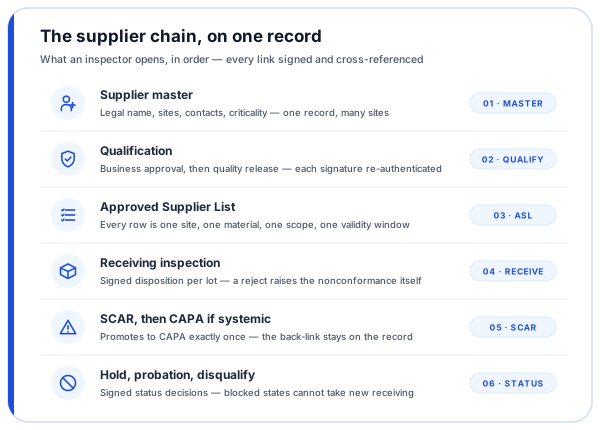
Each step in this workflow is supported by governed records, electronic signatures, and a full audit trail — so quality operations stay traceable and inspection-ready.
Supplier findings are rarely about a missing certificate. They are about a material received outside approved scope, a qualification that was never re-done, or an agreement that does not cover change notification. The module is built so those answers sit on the supplier record rather than in a shared drive next to it. Draft through quality release, then hold, probation, or disqualification when the signals warrant. Each gated transition re-authenticates the signer.
Legal name, internal code, criticality (Critical, Major, Minor), sites, and contacts linked from the platform contact master. A draft can exist with the minimum fields; leaving draft requires at least one site and at least one ASL material row.
Evidence pack, linked risk assessment, and — for Critical and Major — a quality agreement from Document Control with a change-notification clause. Multi-signer electronic signature; the quality signer is a different person from the business approver.
Approval is never a supplier-level tick: each row is supplier × site × material × scope × validity window, and scope comes from an enumerated set (manufacture, distribute, service, calibrate, sterilize, test, consult, transport) rather than free text.
Lot or batch against that ASL row. Disposition is Accepted, Rejected, Use As Is, Rework, or Returned — each signed. A reject-class disposition creates a nonconformance in Quality Events with supplier, site, lot, and quantity already filled.
A supplier corrective-action request against a systemic issue. One action promotes it to a CAPA in the CAPA module, with a back-reference. Promotion is once; a second CAPA from the same SCAR is refused.
Disqualification is a signed decision reserved for quality-authority roles. A coordinator may place a precautionary hold. A new receiving inspection cannot be raised against either state; a new SCAR is blocked only for Disqualified.
The specific controls, features, and workflow functions built into this module to support your quality and compliance objectives.
One record per supplier with independent sites and contacts linked from the platform contact master. Parent-child hierarchy is informational; it does not confer qualification.
Configurable multi-signer thresholds, frozen per record. Two-person rule: the quality signer is not the same individual as the business approver. Status transitions that release the supplier re-authenticate at the moment of signing.
ASL at site × material × scope × date. A disqualified supplier does not keep its materials on the active list. Validity windows expire; an expired row does not permit a new receiving inspection.
Critical and Major suppliers cannot reach Approved without a linked, signed quality agreement. The record carries a change-notification clause. Expiry blocks continued ASL eligibility until renewal.
Per lot, bound to supplier, site, and material. Signed disposition. Reject-class outcomes open a Quality Events nonconformance without re-keying the lot data.
Create a SCAR from the supplier, from a supplier-attributed event, or from a supplier-audit finding. A receiving-inspection rejection raises a nonconformance; that event can then be opened as a SCAR. Promote once to CAPA. The CAPA lifecycle then runs in the CAPA module.
No parallel audit table. Audits of type supplier reference the auditee and reuse the Audit Management lifecycle. Link an existing audit to a supplier from the supplier record.
Record a period snapshot. Simple computed counts from linked events, SCARs, and audits sit beside recorded scores. The full multi-source weighted auto-scoring engine is not in this release.
Purchasing controls, receiving blocks, audits, and the scorecard.
The module is built against those purchasing-controls expectations. ISO 13485:2016 §7.4 requires criteria for selecting, evaluating, and re-evaluating suppliers, and control proportionate to risk. Under the QMSR (effective 2026-02-02), 21 CFR Part 820 incorporates ISO 13485:2016 §7.4 by reference; the same purchasing-controls expectation was historically stated in 21 CFR 820.50. What the module ships is a supplier master, qualification with electronic signature, a granular approved-supplier list, quality agreements, receiving inspection with disposition, and SCARs that can promote to CAPA.
Six records, one chain, all on the supplier record: the supplier master (legal name, sites, contacts, criticality), the qualification that put the supplier on the list — business approval then quality release, each re-authenticated — the ASL row for that site, material, scope, and validity window, the quality agreement with its change-notification clause for Critical and Major suppliers, the last receiving inspection with its signed disposition (a reject-class disposition already links the nonconformance in Quality Events), and, if the issue was systemic, the SCAR with its CAPA back-link.
A new receiving inspection cannot be raised against a supplier that is Disqualified or On Hold. The block is enforced on the server, not only in the picker. Raising a SCAR against a supplier that is On Hold is permitted — a corrective action is often the path that resolves the hold. A Disqualified supplier cannot be selected for a new SCAR. Existing records created while the supplier was in good standing remain readable and workable.
Not in this release. Supplier masters, qualification, receiving inspection, quality agreements, and SCARs are operated by your quality team inside the tenant. There is no supplier-facing login, and no claim that the supplier fills questionnaires in Complere.
Supplier audits run in the Audit Management module as audits of type supplier, with the auditee supplier referenced on the record. They reuse that module's lifecycle, signing, and findings. A finding can be opened as a SCAR. There is no separate supplier-audit workflow.
You can record a scorecard snapshot per supplier. The view includes recorded scores and simple computed counts from linked events, SCARs, and audits. A full multi-source weighted auto-scoring engine is not in this release.
Not uniformly. A new receiving inspection is blocked for Disqualified and On Hold. A new SCAR is blocked for Disqualified only. Events and Audits supplier pickers are not yet status-filtered. Do not assume every picker in the platform already applies the receiving rule.
We will walk the same chain: master, qualification signatures, ASL row, last receiving inspection, and whether a SCAR exists.